ai-agents · no-code
Agentic AI Design Patterns: A Practical Guide for Pal Builders
The design patterns that keep AI agents reliable in production: validation, error recovery, context management, governance, and cost control.
 Ian Likono8 min read
Spinning up a working AI agent has never been easier. Describe what you want it to do in plain English, wire it to a few tools, and watch it complete a task. The hard part shows up later — the moment that same agent meets a malformed API response, a rate-limited model, or a customer message nobody anticipated.
That gap between "works in the demo" and "works every day, unattended" is exactly what agentic AI design patterns are meant to close. This guide walks through the patterns that matter most once a Pal leaves the sandbox and starts running real work, and how CogniPal builds them into the platform so you don't have to engineer them from scratch.
What makes an agent "agentic"
A plain LLM call is a one-shot exchange: you send a prompt, you get text back. It has no memory of what happened last time, no way to check its own work, and no ability to touch anything outside the conversation.
An agent changes that by putting the model inside a loop instead of a single call. It observes the current state of a task, reasons about what to do next, takes an action — calling a tool, querying a system, sending a message — and then observes the result before deciding what happens next. That loop, repeated until the goal is met, is what turns a language model from a text generator into something that can actually get work done on your behalf. It's the core idea behind every Pal on CogniPal: you describe the outcome you want, and the Pal figures out the sequence of tool calls needed to reach it.
The patterns that keep agents production-ready
Getting an agent to loop is the easy part. Getting it to loop safely, cheaply, and predictably at scale is where most teams get stuck. A handful of recurring patterns address that.
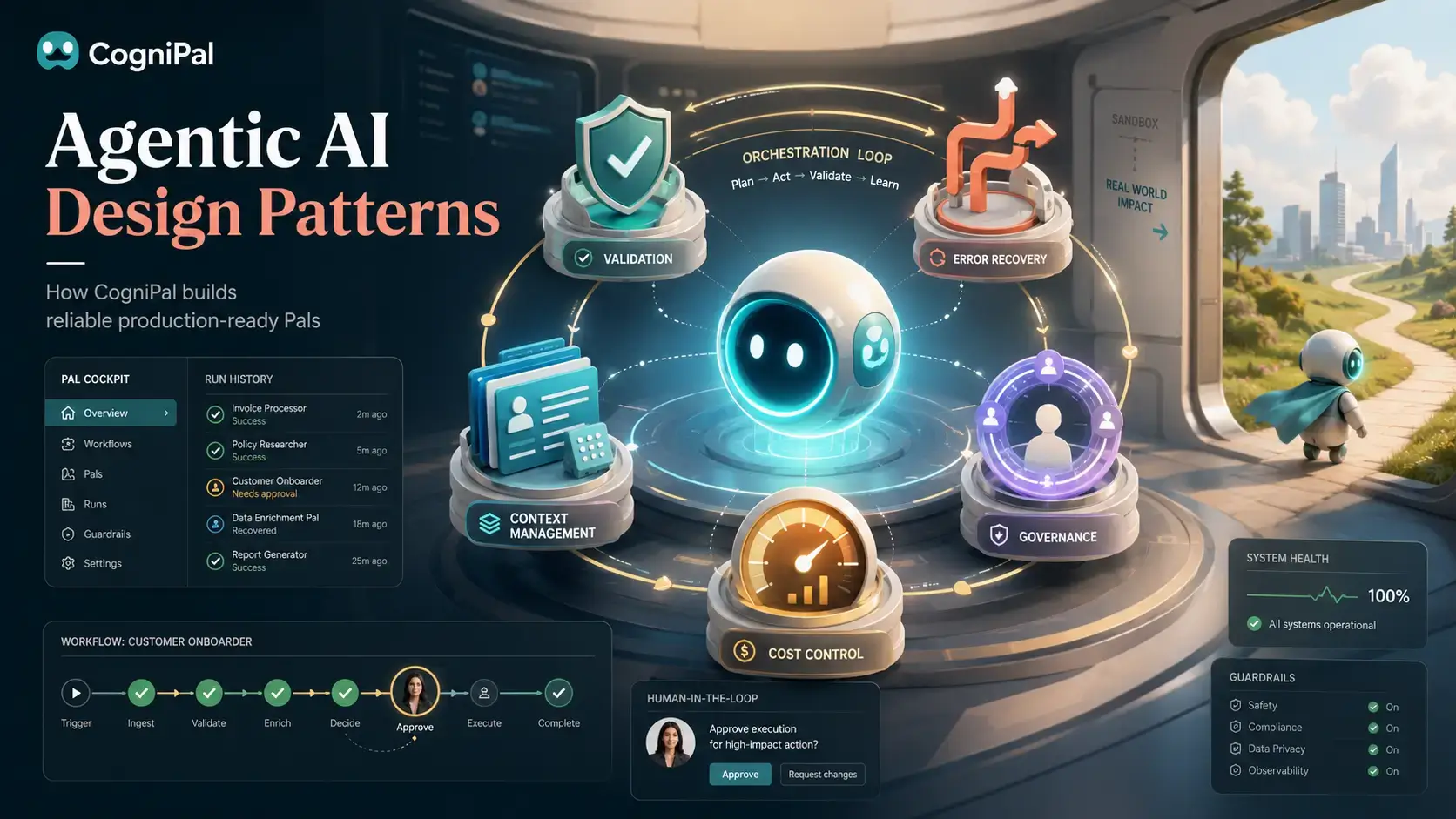
Validation
Models don't always return what you asked for. A field goes missing, a JSON payload comes back malformed, or the model states something with total confidence that simply isn't true.
Validation patterns catch this before a bad output reaches a customer or a downstream system — enforcing structured output formats, checking responses against an expected schema, or having the model critique its own answer before it's allowed to proceed.
Every Pal you build in CogniPal can include validation steps as part of its plan: schema checks on tool outputs, automatic retries when a response doesn't fit the expected shape, and an option to route anything that fails validation to a human instead of letting it through.
Error recovery
Third-party APIs go down. Model providers hit capacity. Rate limits get tripped at the worst possible moment. None of this is avoidable — what's avoidable is letting one hiccup take down an entire workflow.
Error recovery patterns give a Pal somewhere to go when something breaks: retrying with backoff, falling back to a secondary model or provider, or escalating to a person when automated fixes run out. The goal isn't zero failures — it's making sure a single failure doesn't cascade.
CogniPal Pals support fallback model routing and automatic retry logic out of the box, so a rate limit on one provider doesn't stall the whole Pal — it just quietly reroutes and keeps going.
Context management
Handing an agent more information isn't automatically better. Overload the context window and you pay for tokens the model never needed, while burying the details that actually matter. Starve it of context, and the Pal starts making decisions on incomplete information.
Context management patterns strike that balance — memory that persists across steps, retrieval that pulls in only what's relevant to the current task, and summarization that keeps long-running conversations from bloating out of control.
Behind the scenes, CogniPal Pals draw on a retrieval layer across your connected tools and knowledge sources, so a Pal calling into one of CogniPal's MCP servers pulls exactly the context it needs for that step — not everything it's ever seen.
Governance
The more a Pal can touch — your CRM, your billing system, your customer inbox — the more it matters that someone can see what it did and stop it before it does something wrong. Autonomy without oversight isn't a feature, it's a liability waiting to happen.
Governance patterns put guardrails around what an agent is allowed to do unsupervised: approval steps before high-impact actions, audit trails for every decision, and role-based limits on which tools a Pal can even reach.
This is where CogniPal's human-in-the-loop checkpoints come in. You decide which actions need a human sign-off — sending an email to a customer list, updating a production record, issuing a refund — and the Pal pauses and waits rather than acting alone. Every run is logged, so if something does go sideways, you can trace exactly which step made the call and why.
Cost control
AI spend doesn't creep up gradually — it jumps. A single Pal calling an expensive reasoning model on every request, or dragging a bloated context window into every step, can burn through a budget fast.
Cost control patterns keep that in check: cascading from a cheap, fast model to a more capable one only when a task actually needs it, caching repeated responses, and setting hard limits on token or request spend per task.
CogniPal's credit system is built around this same logic — a monthly AI credit allowance separate from your wallet balance, so you can see exactly what routine Pal runs cost versus one-off, heavier tasks, and set your Pals to use lighter models by default and escalate only when a task calls for it.
Combining patterns in a real Pal
In practice, no serious deployment relies on just one pattern. A support Pal, for example, might pull relevant answers from your knowledge base, validate its draft response against a tone and accuracy check, escalate anything it's not confident about to a teammate, and automatically switch providers if its primary model is rate-limited — all in a single run.
As you add more Pals across more parts of the business, a few things start to matter more:
- Keeping track of what each Pal is allowed to touch as your tool surface grows
- Managing rate limits across multiple model providers without one Pal starving another
- Being able to trace a specific decision back through the run that produced it
- Updating a Pal's instructions without breaking everything downstream that depends on it
This is the problem CogniPal's Pal Cockpit is built to solve — a single place to see every Pal you've built, what it's connected to, how it's performing, and where it needs a human in the loop, instead of that logic living scattered across scripts and cron jobs.
What can actually go wrong
Letting an agent act on your behalf without guardrails isn't a hypothetical risk — it's the most common way these projects fail once they leave the demo stage.
- Runaway loops. An agent that hits an unexpected response can get stuck retrying the same failing action indefinitely, quietly burning through your credits while nothing gets fixed.
- Tool misuse. A misread instruction or a messy payload can lead a model to construct a technically valid but destructive action — the wrong record deleted, the wrong message sent to the wrong list.
- Data exposure. Passing raw, unfiltered business data into an agent's context risks that data leaving your perimeter through a model provider you don't fully control.
CogniPal addresses this directly: built-in loop and iteration limits stop a Pal from spinning indefinitely, human-in-the-loop checkpoints gate any action you flag as sensitive, and full run histories in the Pal Cockpit let you see exactly what a Pal did and why, step by step.
Autonomy needs structure, not just a bigger model
Turning a fragile prototype into something you can trust to run unattended isn't about swapping in a smarter model. It's about deliberately building in the checks, fallbacks, and oversight that let autonomy scale without losing control.
That's the thinking behind how CogniPal Pals work: you describe what you want in plain English, and validation, error recovery, context management, governance, and cost control come built into the way the Pal runs — not bolted on afterward.
FAQ
Can one Pal use more than one of these patterns at once? Yes — most real Pals combine several. A single Pal might validate its own output, fall back to a secondary model on failure, and pause for human approval before taking a sensitive action, all in the same run.
How does CogniPal stop a Pal from looping forever? Every Pal run has iteration and step limits built in. If a Pal can't resolve a task within those limits, it stops and routes the run to a human or an error path instead of retrying indefinitely.
What's the difference between a design pattern and a platform feature? Patterns are the underlying strategies — validation, fallback routing, human approval, and so on. CogniPal turns those patterns into things you toggle on for a Pal in plain English, rather than infrastructure you'd otherwise have to code and maintain yourself.
How do I know if my Pals are working well in production? Beyond whether a Pal completes its task, watch its credit spend per run, how often it escalates to a human, and how often it needs a fallback model. The Pal Cockpit surfaces all three so you can spot a problem before it becomes expensive.
Building a Pal that needs to run reliably in production? Start building on CogniPal and add validation, fallbacks, and human checkpoints without writing a single line of orchestration code.
Get posts like this in your inbox
One email every other week. No spam, unsubscribe anytime.